Best Age Progression Apps and Websites for Making Photos Look Older
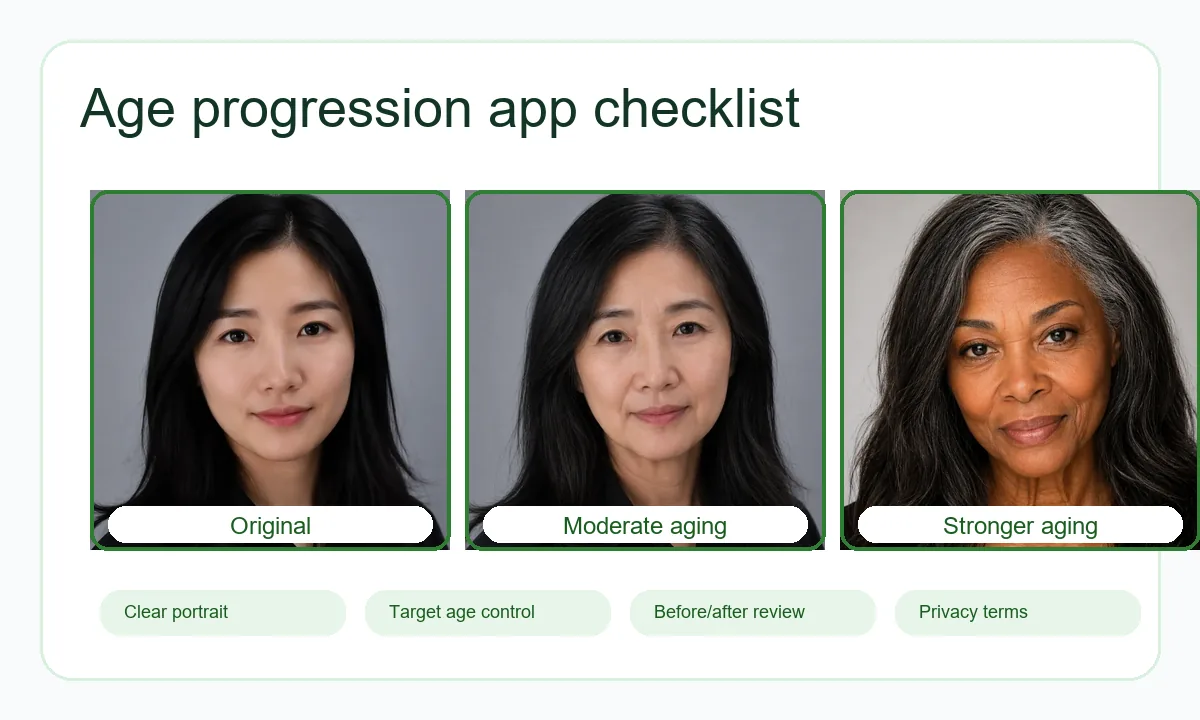
The best age progression app is not always the one with the most dramatic old-age effect. A useful tool should keep the person recognizable, let you control the target age, show a clear before-and-after result, and explain how your photo is handled. This guide compares what to look for before you upload a face photo.
Quick Answer
If you want a browser-based age progression website, choose a tool that accepts a clear portrait, lets you set an older target age, shows a before-and-after comparison, and provides a watermark-free download. AI Age Filter is best when you want a focused online workflow for making a face older or younger without installing an app. Mobile novelty apps can be better for casual social effects, while professional retouching tools are better when you need manual control.
Age Progression App Types Compared
Search results mix very different tools: browser tools, mobile face filter apps, manual photo editors, and entertainment filters. Use the comparison below to match the tool to the job instead of choosing only by a dramatic preview image.
| Tool type | Best for | Watch out for |
|---|---|---|
| Online AI age filter website | Quick upload, target age control, before-and-after preview, no app install | Check pricing, retention policy, consent rules, and whether downloads have a watermark. |
| Mobile old age filter app | Casual selfies, social sharing, quick novelty effects | Some apps emphasize entertainment over realism and may require subscriptions or broad photo permissions. |
| Manual photo editor | Designers who want precise retouching control | Requires more time and skill; age progression can look inconsistent without portrait-retouching experience. |
| AI image generator prompt | Creative character concepts or fictional portraits | May change identity, hairstyle, background, or facial structure more than a dedicated age filter. |
7 Criteria for Choosing the Best Age Progression App
Before uploading a portrait, check whether the tool gives you enough control and enough information to trust the result. These criteria matter more than a single example image.
Target age control
Look for a slider or age setting so you can test a subtle future-self result before trying a much older portrait.
Identity preservation
The eyes, nose, mouth, face outline, and expression should still feel like the same person after aging.
Before-and-after comparison
A side-by-side or draggable comparison makes it easier to spot over-processing, texture artifacts, or identity drift.
Download quality
Check whether the final image is large enough for your use and whether the download includes a watermark.
Input guidance
Good tools explain that single-face, well-lit portraits usually work better than blurry, cropped, or heavily filtered photos.
Privacy and retention policy
The page should explain how uploads are processed, whether images are retained, and what uses are prohibited.
Responsible-use limits
Age progression images should be treated as simulations, not identity evidence, age verification, or claims about a real future.
Which Option Should You Use?
The right choice depends on whether you need a realistic online age-up photo, a playful social effect, or a design workflow.
Use AI Age Filter for a focused online workflow
Choose AI Age Filter when you want to upload a portrait, choose an older or younger target age, compare the result, and download a watermark-free image from the browser.
Use a mobile filter app for casual social posts
If your main goal is a quick selfie effect for social media, a mobile app can be convenient, but review subscription prompts and photo permissions first.
Use manual editing for professional composites
For campaigns, film concepts, or highly controlled retouching, a professional editor may need to refine wrinkles, hair, lighting, and skin texture manually.
Use AI generators for fictional characters only
Prompt-based image generators can help with fictional older characters, but they are less reliable when you need the same real person preserved.
Photo Tips for Better Age Progression Results
Every age progression app depends on the uploaded image. Better input usually matters more than repeating the same tool several times.
Privacy, Consent, and Accuracy Limits
Age progression apps create simulations. They cannot predict exactly how someone will age because real aging depends on genetics, health, lifestyle, sun exposure, camera conditions, hairstyle, and many other factors. Treat the output as a creative preview, not a factual forecast.
Read the tool privacy policy before uploading faces. Avoid uploading images of other people without permission, and never use an aged photo for identity fraud, harassment, age verification, or misleading claims.
Related AI Age Tools
Best Age Progression Apps FAQ
Want to Test an Age Progression Result?
Upload a clear portrait, choose an older or younger target age, and compare the before-and-after result in AI Age Filter.
Open AI Age Filter